

Introduction
In retail and hospitality businesses, accurate transactions are critical for maintaining customer trust and ensuring operational efficiency. Errors at the point of sale can lead to financial losses, inventory discrepancies, and dissatisfied customers. As businesses grow, managing these errors manually becomes increasingly challenging. This is where a modern desktop POS system proves invaluable. Desktop POS machines combine robust hardware and advanced software to automate transaction processing, reducing errors and improving overall accuracy in daily operations.
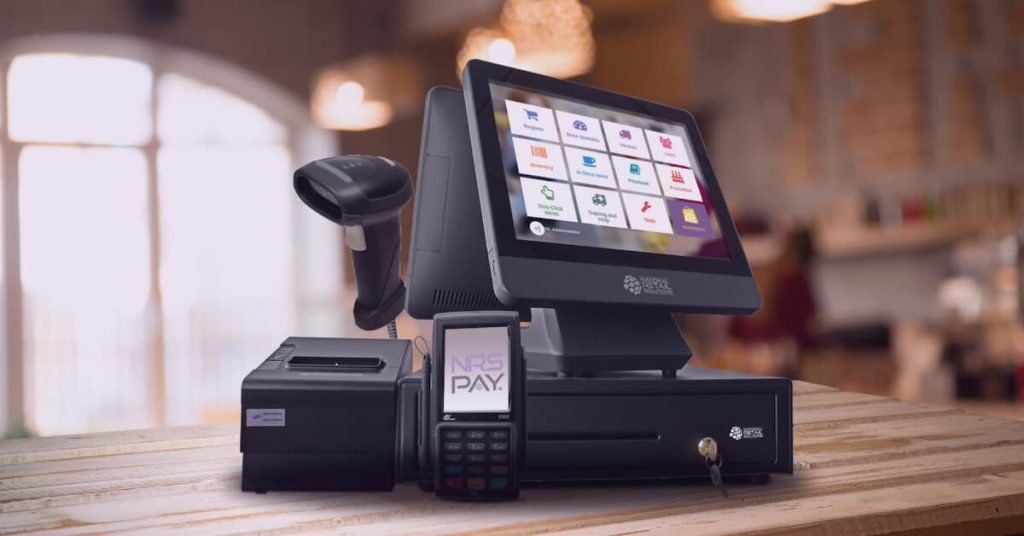
A desktop POS system integrates components such as a computer terminal, barcode scanner, receipt printer, cash drawer, and specialized software to manage sales, inventory, and payments. Many businesses rely on a Desktop POS Machine because it ensures precise calculations, automates repetitive tasks, and provides detailed records for every transaction. By streamlining these processes, retailers and service providers can maintain accuracy, reduce disputes, and improve customer satisfaction.
Automated Calculations and Pricing
One of the most significant ways a desktop POS machine improves transaction accuracy is through automated calculations. Traditional cash registers or manual billing systems require employees to input prices and calculate totals manually, which can lead to mistakes. Desktop POS systems automatically calculate item totals, taxes, discounts, and loyalty rewards. This automation reduces human error, ensuring that customers are charged correctly every time.
Additionally, desktop POS systems can apply dynamic pricing, promotional offers, and bulk discounts automatically. This capability eliminates confusion at the checkout counter, providing customers with correct pricing and preventing revenue loss due to miscalculations.
Barcode Scanning for Error Reduction
Barcode scanning is another key feature that enhances accuracy in transactions. Desktop POS machines are equipped with scanners that quickly read product codes and retrieve associated pricing and inventory data from the POS database. This eliminates the need for manual product entry, which is prone to errors, especially in stores with large inventories.
By scanning each item accurately, businesses ensure that every sale is recorded correctly, and inventory levels are updated in real time. This not only reduces checkout errors but also helps maintain accurate stock records, preventing discrepancies and enabling better inventory management.
Secure Payment Processing
Payment accuracy is just as important as product pricing. Desktop POS machines support multiple payment methods, including cash, credit cards, debit cards, and digital wallets. Integrated payment processing ensures that the exact amount is charged and securely transmitted to the payment provider. Features like chip-and-PIN, contactless payments, and encryption protocols reduce the risk of errors and fraud during financial transactions.
By automating payment processing, businesses can avoid issues such as incorrect change calculation, double charging, or misreported sales, ensuring that customers have a seamless and reliable payment experience.
Real-Time Inventory Updates
Accurate transaction recording also benefits inventory management. Every sale processed through a desktop POS system automatically updates stock levels in real time. This ensures that inventory records reflect actual product availability, preventing overstocking or stockouts. Accurate inventory tracking reduces errors in ordering and restocking, improving supply chain efficiency and supporting informed business decisions.
Real-time updates also help managers monitor product performance, identify best-selling items, and detect discrepancies quickly. This level of accuracy is difficult to achieve with manual systems or less advanced POS solutions.
Detailed Reporting and Audit Trails
Desktop POS machines provide detailed reporting features that enhance accuracy across the business. Every transaction, including item sold, payment method, and employee handling the sale, is logged in the system. This audit trail allows managers to review sales data, detect anomalies, and verify transaction integrity.
Reports generated by desktop POS systems help businesses reconcile cash, identify discrepancies, and ensure compliance with financial regulations. Accurate record-keeping supports better decision-making and provides a reliable source of data for accounting and performance analysis.
Employee Efficiency and Reduced Errors
By automating key tasks, desktop POS machines allow employees to focus on customer service rather than manual calculations or data entry. With user-friendly interfaces, touchscreens, and guided workflows, employees are less likely to make mistakes during checkout. Role-based access controls also ensure that only authorized staff can perform certain operations, further reducing the risk of human error.
Conclusion
A desktop POS machine significantly improves transaction accuracy by automating calculations, providing barcode scanning, supporting secure payment processing, updating inventory in real time, and generating detailed reports. These systems minimize human error, streamline operations, and provide reliable data for inventory and sales management.
Retailers and service providers that invest in a desktop POS machine benefit from precise transactions, improved operational efficiency, and enhanced customer satisfaction. Accurate billing and inventory tracking reduce financial discrepancies and disputes, ensuring smoother daily operations. In a competitive retail landscape, desktop POS machines are not just tools for convenience—they are essential for maintaining accuracy, efficiency, and trust in every transaction.


